A Practical Guide to Qdrant for RAG Applications
A Practical Guide to Qdrant for RAG Applications
Published:
A Practical Guide to Qdrant for RAG Applications
Large language models are powerful, but they do not inherently know the private or domain-specific knowledge required in many real-world applications. This is where Retrieval-Augmented Generation (RAG) becomes useful: instead of relying solely on the model’s parametric memory, we retrieve relevant documents from an external knowledge base and pass them to the model as context.
A core component of many RAG systems is the vector database. In my work, I have used vector retrieval as part of several GenAI pipelines, and one tool that stands out for its simplicity and practical usability is Qdrant.
In this article, I will give a practical introduction to Qdrant: what it is, why it is useful, how it fits into a RAG system, and what design considerations matter when using it in practice.
Why a vector database is needed in RAG
In a typical RAG pipeline, documents are first transformed into embeddings, which are dense numerical vectors produced by an embedding model. User queries are also embedded into vectors. We then search for the most similar document vectors and return the corresponding text chunks as candidate context for the LLM.
This workflow raises a problem: once we have thousands or millions of vectors, we need an efficient way to store them, search them, and filter them. A simple Python list or flat file is no longer sufficient. We need infrastructure that supports:
- efficient similarity search
- metadata storage
- filtering by structured attributes
- updates and maintenance
- scalable retrieval performance This is the role of a vector database. —
What is Qdrant
Qdrant is an open-source vector database designed for similarity search and retrieval tasks. It stores dense vectors together with metadata (called payloads in Qdrant), and it supports approximate nearest neighbor search for efficient retrieval.
From an engineering perspective, Qdrant is attractive because it is relatively easy to deploy, has a clean API, and supports an important practical feature: payload-based filtering. In many enterprise or domain-specific RAG systems, retrieval is not just “find similar text”; it is often “find similar text, but only from a certain source, document type, region, product line, or date range.” This is where metadata filtering becomes essential.
At a high level, Qdrant provides the following building blocks:
- Collection: a logical container for vectors, similar to a table in a database
- Point: a stored record containing an ID, a vector, and optional payload
- Vector: the embedding representation of a document chunk
- Payload: structured metadata associated with the vector
Index: the search structure that enables efficient nearest neighbor retrieval
How Qdrant fits into a RAG architecture
A simple RAG architecture with Qdrant can be built using the following workflow:  Figure 1. A basic RAG pipeline with Qdrant as the retrieval layer.
Raw documents are first split into chunks and converted into embeddings. These embeddings are stored in Qdrant together with metadata. At query time, the user question is also embedded and used to retrieve relevant chunks, which are then passed to the LLM as context for answer generation.
- Raw documents are ingested from files, web pages, databases, or internal systems.
- Documents are split into chunks.
- Each chunk is converted into an embedding vector.
- The vector and its metadata are stored in Qdrant.
- At query time, the user question is embedded.
- Qdrant retrieves the most relevant chunks.
- The retrieved chunks are passed to the LLM as context.
- The LLM generates the final answer. In this flow, Qdrant is the retrieval layer between embeddings and answer generation. —
Why I would choose Qdrant in practice
There are many vector storage solutions today, including FAISS, OpenSearch, Pinecone, Weaviate, and others. Qdrant is not the only choice, but it is a very practical one in several common scenarios.
1. It is easy to understand and use
Qdrant has a relatively straightforward mental model. If you understand vectors, metadata, and nearest-neighbor search, you can get productive quickly. For small to medium-sized systems, this simplicity matters a lot.
2. Metadata filtering is first-class
As is known to us, in real applications, semantic similarity alone is often not enough. We usually want constraints such as:
- only retrieve documents for a specific product
- only retrieve chunks from physician profiles in a given hospital
- only search within a document subset
- only retrieve records from a certain language or market Qdrant’s payload filtering makes this much easier to implement cleanly.
3. It works well for RAG-oriented workflows
Many retrieval tasks in GenAI applications are not generic vector search tasks; they are retrieval pipelines that depend on chunk-level metadata, iterative updates, and structured retrieval logic. Qdrant fits this pattern well.
4. It is deployment-friendly
Qdrant can be run locally, in Docker, or through managed/cloud options. For prototyping and early-stage systems, this is especially convenient.
Basic concepts you need before using Qdrant
Before implementing Qdrant, it helps to clarify three concepts to understand how data is organized in Qdrant.
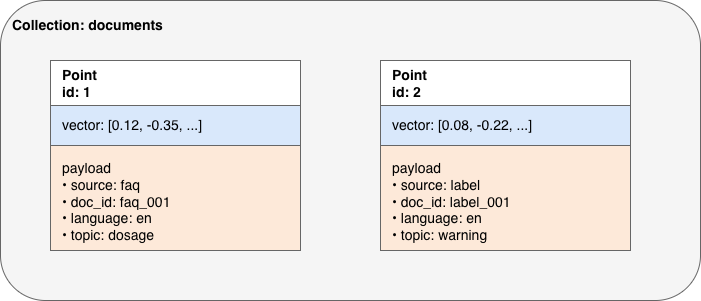 Figure 2. Qdrant data model: collections, points, vectors, and payloads.
In Qdrant, data is stored as points within a collection. Each point contains an embedding vector and an associated payload (metadata). This vector-plus-payload design allows the system to support both semantic similarity search and structured filtering.
Embeddings
An embedding is a vector representation of text. Chunks with similar meaning should be close to one another in vector space. The quality of retrieval depends strongly on the embedding model you choose.
Approximate nearest neighbor search (ANN)
In theory, we could compare a query vector against every stored vector. In practice, this becomes expensive as the dataset grows. Approximate nearest neighbor (ANN) search trades a small amount of exactness for much better speed, which is essential for scalable retrieval.
Metadata schema design
In many systems, the vector itself is not enough. You need metadata such as:
- source
- title
- chunk index
- category
- language
- product
- document ID
- update timestamp Designing metadata well is just as important as generating embeddings. —
A minimal example of creating a Qdrant collection
Below is a minimal example using the Python client.
from qdrant_client import QdrantClient
from qdrant_client.models import VectorParams, Distance


client = QdrantClient(host="localhost", port=6333)

client.create_collection(
	collection_name="documents",
	vectors_config=VectorParams(
	size=1536,
	distance=Distance.COSINE
	)
)
This creates a collection named “documents” with 1536-dimensional vectors and cosine distance as the similarity metric. The vector dimension must match the output dimension of your embedding model. For example, if you switch embedding models, you may need to recreate the collection or create a new one.
Inserting vectors with metadata to an existing Qdrant collection
In a real RAG pipeline, each chunk is stored together with metadata. A simplified example looks like this:
from qdrant_client.models import PointStruct

points = [
    PointStruct(
        id=1,
        vector=[0.1] * 1536,
        payload={
            "source": "faq",
            "doc_id": "faq_001",
            "chunk_id": 0,
            "language": "en",
            "topic": "dosage"
        }
    ),
    PointStruct(
        id=2,
        vector=[0.2] * 1536,
        payload={
            "source": "label",
            "doc_id": "label_001",
            "chunk_id": 1,
            "language": "en",
            "topic": "warning"
        }
    )
]

client.upsert(
    collection_name="documents",
    points=points
)
This is the basic pattern for storing chunk embeddings in Qdrant: each point contains both semantic information (the vector) and structured information (the payload).
Searching in Qdrant
Once vectors are stored, we can search using a query embedding.
results = client.search(
    collection_name="documents",
    query_vector=[0.15] * 1536,
    limit=3
)

for r in results:
    print(r.id, r.score, r.payload)
This returns the top matching 3 points. In practice, the query_vector would come from embedding the user question.
The retrieval score helps rank candidates, but downstream logic may still be needed. For example, you may combine similarity score thresholds, metadata filtering, reranking, or answerability checks.
Semantic retrieval with metadata filtering
In practical RAG systems, retrieval is rarely based on similarity alone. Instead, it often needs to satisfy both semantic relevance and structured constraints, such as restricting results to a specific source, language, or document type.
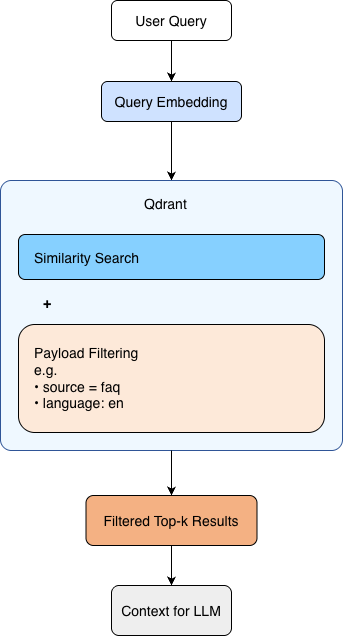 Figure 3. Semantic retrieval with payload-based filtering in Qdrant.
At query time, the user question is converted into an embedding and used to search the vector store. Qdrant combines similarity search with payload-based filtering, allowing results to remain both semantically relevant and constrained by structured metadata such as source or language.
Why metadata filtering matters so much
To me one of the most useful features in Qdrant is payload filtering. This becomes critical when your knowledge base is heterogeneous.
Suppose you only want documents in English from a certain source. You can filter before or during retrieval rather than retrieving everything and performing post-processing.
A simplified conceptual example:
from qdrant_client.models import Filter, FieldCondition, MatchValue

search_filter = Filter(
    must=[
        FieldCondition(
            key="source",
            match=MatchValue(value="faq")
        ),
        FieldCondition(
            key="language",
            match=MatchValue(value="en")
        )
    ]
)

results = client.search(
    collection_name="documents",
    query_vector=[0.15] * 1536,
    query_filter=search_filter,
    limit=3
)
This is important for at least three reasons:
- It improves retrieval precision.
- It reduces irrelevant context sent to the LLM.
- It gives better control over enterprise or domain-specific knowledge boundaries.
In many applied GenAI systems, metadata-aware retrieval is what separates a toy demo from a useful system.
Practical design considerations
Using Qdrant successfully is not just about calling the API. A few design choices matter a lot.
1. Chunking strategy affects retrieval quality
Poor chunking can make even a strong vector database look bad. If chunks are too large, retrieval becomes noisy. If they are too small, context becomes fragmented. Chunk size, overlap, and segmentation strategy should be chosen based on the document type and downstream task.
2. Metadata structure should be designed intentionally
Do not treat payload as an afterthought; treat Qdrant payloads like regular database columns: standardize names and types, define indexing strategy; think ahead about what filters you may need, e.g.
- by source
- by market
- by physician or hospital
- by product
- by language
- by document type A poor metadata schema can make it challenging for later filtering and maintenance.
3. Embedding model selection is foundational
If retrieval is poor, the issue may not be Qdrant itself. It may come from weak embeddings, inappropriate chunking, or low-quality source text. Retrieval quality is a system-level outcome.
4. Vector store updates need a strategy
In production systems, documents are rarely static. You need to think about:
- appending new documents
- replacing outdated chunks
- versioning
- re-embedding when the embedding model changes
These operational details matter more over time.
5. Thresholding and reranking may still be needed
Vector similarity alone does not guarantee relevance. In many systems, an additional reranking step or minimum-score threshold improves answer quality.
Where Qdrant works especially well
From my point of view, Qdrant is especially suitable for the following scenarios:
- RAG systems for internal or domain-specific knowledge
- semantic search over chunked text corpora
- applications that need metadata-based filtering
- prototype-to-production pipelines where deployment simplicity matters
- systems where engineers want direct control over retrieval logic
It is particularly useful when your application needs both semantic similarity and structured filtering at the same time.
When Qdrant may not be the only answer
Qdrant is strong, but every architecture has tradeoffs.
If your system already relies heavily on a search ecosystem built around lexical retrieval, document ranking, and large-scale operational search infrastructure, alternatives such as OpenSearch may be worth considering. Likewise, if you only need a lightweight in-memory similarity layer for experimentation, FAISS may be enough.
For this reason, I see Qdrant as an excellent retrieval engine for many RAG systems, but not necessarily the universal answer to every search problem. Tool choice should follow the product and infrastructure constraints.
I plan to write a separate post comparing Qdrant, OpenSearch, and FAISS in more detail, because that deserves a focused discussion rather than a short subsection here.
Lessons learned
The main lesson I would highlight is this: a vector database is only one layer in a retrieval system. Good results come from the combination of:
- high-quality source data
- sensible chunking
- appropriate embeddings
- well-designed metadata
- strong retrieval logic
- careful evaluation
Qdrant makes the storage and retrieval layer much easier to implement, especially when metadata filtering is important. But retrieval performance is ultimately a full-pipeline problem, not just a database problem.
That is also why I think learning vector databases in isolation is not enough. They should be understood as part of an end-to-end GenAI system.
Conclusion
Qdrant is a practical and effective vector database for RAG applications. Its clean model, support for approximate nearest neighbor search, and strong metadata filtering make it especially useful in applied GenAI systems where retrieval needs to be both semantic and structured.
If you are building a RAG pipeline and want a vector store that is relatively simple to deploy, easy to reason about, and suitable for metadata-aware retrieval, Qdrant is a strong option.
In future posts, I want to expand this discussion in two directions:
- how to design chunking and retrieval strategies for better RAG quality
- how Qdrant compares with alternatives such as OpenSearch and FAISS